

Building a website usually starts with a simple question:
“How should the website look?”
But before choosing colours, fonts, images, animations, or even a development platform, there is a more important question:
“How should the website work?”
That is where a website wireframe comes in.
A wireframe is a simplified visual plan of a website. It helps define the structure of a page, the placement of important elements, navigation, content hierarchy, and user journey before the detailed design and development begin.
For businesses researching web development companies in Mohali, web designing companies in Mohali, or website development services in Chandigarh, understanding wireframing can make it easier to evaluate how a website project should actually be planned.
A good wireframe does not try to make the website beautiful. It tries to make the website clear, logical, useful, and easy to navigate. Here is how it works.

“Plan the structure before you design the experience.”
What Is a Website Wireframe?
A website wireframe is a basic visual representation of a webpage that shows its structure and functionality before the final design is created.
Instead of finished photographs, colours, graphics, and detailed typography, a wireframe generally uses simple boxes, lines, placeholders, headings, buttons, and content blocks.
Think of it as the blueprint of a website.
For example, a homepage wireframe might show:
- Logo
- Navigation menu
- Hero section
- Primary call-to-action
- Services
- About section
- Benefits or differentiators
- Testimonials
- FAQs
- Contact section
- Footer
The purpose is not to determine exactly how these elements will look. The purpose is to determine where they should appear and how users should move through the page.
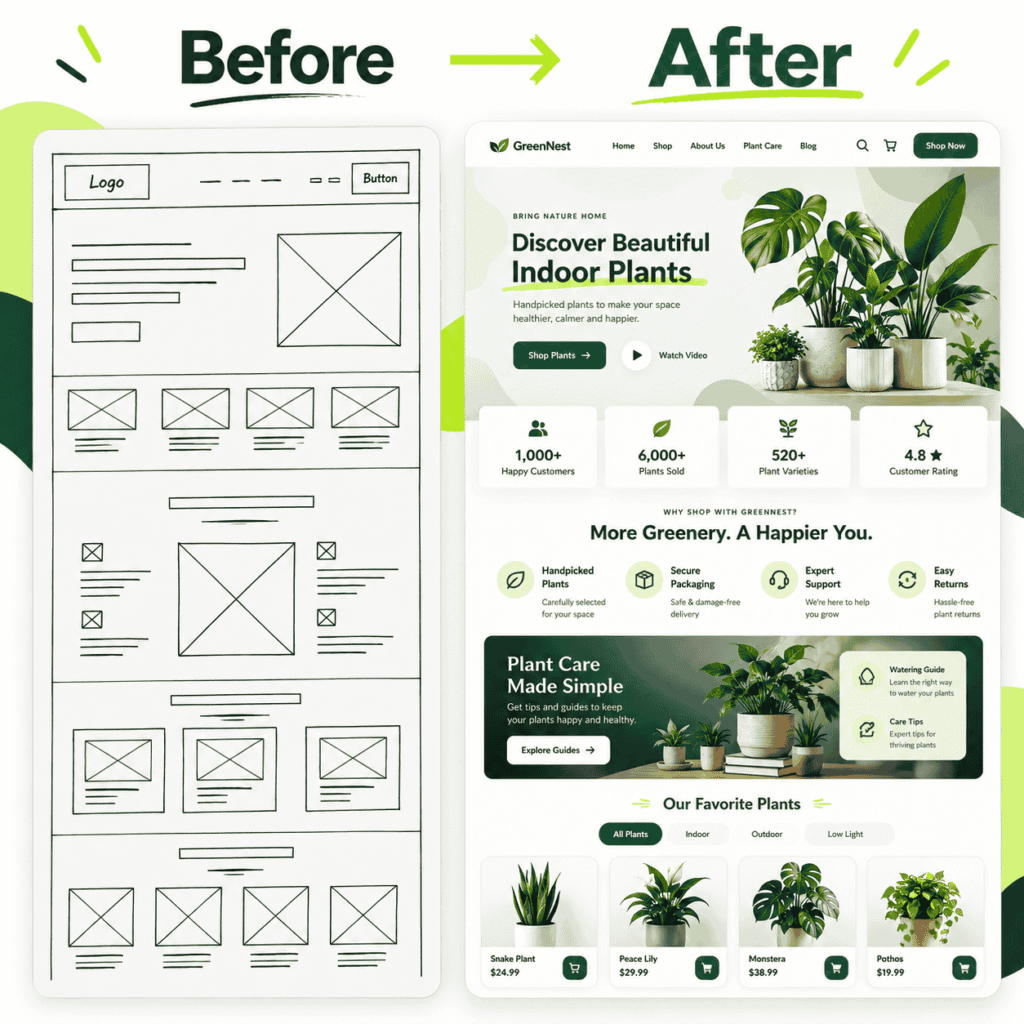
“A great website starts with a clear wireframe.”
Why Is Website Wireframing Important?
A website can look excellent and still be difficult to use.
A visitor might not understand:
- What the business offers
- Where to find a particular service
- What they should do next
- How to contact the company
- Where to find product information
- Why they should trust the business
Wireframing gives you an opportunity to solve these problems before development.
1. It Establishes the Website Structure
Before development begins, you can determine what pages and sections are actually required.
For example:
Homepage → Services → Service Detail → Contact
Or for an ecommerce website:
Homepage → Collection → Product → Cart → Checkout
Mapping this structure early can prevent unnecessary pages and confusing navigation.
2. It Improves the User Journey
Every website should have a logical path for visitors.
A potential customer might arrive through Google, social media, an advertisement, or a direct search.
The wireframe helps answer:
What should this visitor see first?
Then:
What information do they need next?
And finally:
What action should they take?
For a service business, that action might be:
Read service information → understand the offering → see relevant proof → enquire
For an ecommerce business:
Discover product → evaluate product → add to cart → checkout
3. It Makes Website Design More Purposeful
A common mistake is starting with colours and visual styles before deciding what the page needs to accomplish.
Wireframing separates function from aesthetics.
At this stage, you can concentrate on:
- Content hierarchy
- Navigation
- Page structure
- Calls to action
- User flow
- Information architecture
- Conversion paths
The visual design can come later.
4. It Makes Changes Easier
Changing a simple wireframe is generally much easier than changing a developed website.
Imagine discovering after development that:
- The CTA is too far down the page
- The navigation has too many options
- An important service is difficult to find
- Product information appears too late
- The contact section is difficult to reach
These issues are much easier to address during planning.
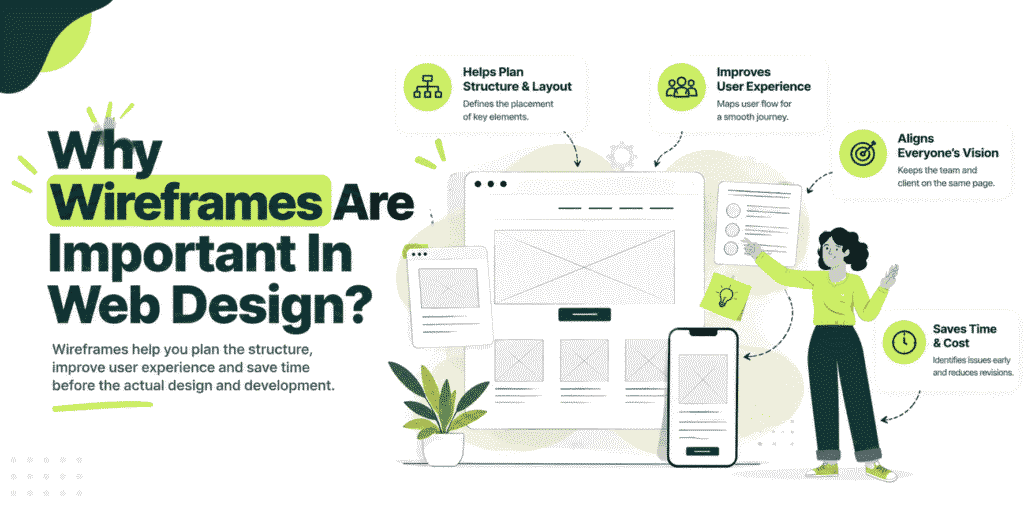
How to Create a Website Wireframe
Creating a website wireframe does not need to start with complicated software. You can begin with paper and a pen and then move to a digital tool such as Figma or another prototyping platform.
Here is a practical process.
1. Define the Website’s Main Goal
Before drawing anything, establish what the website needs to achieve.
Ask:
- Is the website designed to generate enquiries?
- Is it selling products?
- Is it building brand awareness?
- Is it providing information?
- Is it supporting an existing business?
- Is it designed to generate bookings or consultations?
Your answer influences almost every structural decision that follows. For example, a consultancy website may prioritise:
Expertise → Services → Trust → Enquiry
An ecommerce store may prioritise:
Products → Product information → Purchase → Checkout
2. Understand the Target User
A website is created for its visitors—not only for the business owner.
Identify:
- Who will visit the website?
- What are they looking for?
- What problem are they trying to solve?
- What questions might they have?
- What information will help them make a decision?
- What action should they take?
This is particularly important when planning a website for local customers. Someone searching for a website development company in Mohali may have different expectations from someone searching for a Shopify store development partner. Likewise, a business looking for marketing strategy in Chandigarh may need strategic guidance rather than simply a visually attractive website.
Understanding search intent and business intent before creating the wireframe can therefore improve the structure of the final website.
3. Plan the Website’s Information Architecture
Information architecture refers to how the website’s content and pages are organised.
Start by listing the essential pages.
A typical business website might include:
Page | Purpose |
Home | Introduce the business and direct visitors |
About | Build understanding and credibility |
Services | Explain the main offerings |
Service Detail | Provide deeper information |
Blog | Answer informational questions |
FAQs | Address common objections |
Contact | Generate enquiries |
Privacy Policy | Provide required information |
For an ecommerce business, the structure may additionally include:
- Product categories
- Collection pages
- Product pages
- Cart
- Checkout
- Account pages
- Shipping information
- Returns information
The exact architecture should depend on the business rather than following a fixed template.
4. Decide What Belongs Above the Fold
The first screen a visitor sees is extremely important.
Your wireframe should establish what information appears before the visitor needs to scroll.
A service-business homepage might include:
Headline
A clear statement of what the business does.
Supporting Copy
A short explanation of the value offered.
Primary CTA
For example:
Book a Consultation
or
Get Started
Supporting Visual
An image, product visual, interface preview, or another relevant element. The goal is not to put everything above the fold. The goal is to make the business proposition and next step clear.
5. Build the Core Page Sections
Once the basic structure is established, start arranging the major components.
For example, a service homepage could follow this structure:
Header
- Logo
- Navigation
- Primary CTA
Hero
- Main message
- Supporting copy
- CTA
Problem
- Customer challenge
- Relevant context
Solution
- Services or approach
Trust
- Relevant proof
- Testimonials
- Certifications, where applicable
Process
- How the engagement works
FAQs
- Common questions
CTA
- Final conversion opportunity
Footer
- Navigation
- Contact information
- Legal links
The exact structure should change according to the business objective.
6. Plan Your Calls to Action
One of the most important elements in a wireframe is the CTA, or call to action.
Ask yourself:
What do I want the visitor to do after understanding this page?
Possible CTAs include:
- Get in Touch
- Book a Consultation
- Request Information
- View Products
- Explore Services
- Start Your Project
- Contact Us
Avoid placing multiple competing CTAs everywhere. A page should generally have a clear primary action.
For example:
Primary CTA: Schedule a Consultation
Secondary CTA: Explore Services
This gives the visitor a logical next step without overwhelming them.
7. Consider Mobile Before Development
A wireframe should not be planned only for desktop.
Your website needs to work across different screen sizes.
Consider:
Desktop
- Wide navigation
- Multi-column sections
- Larger content blocks
Mobile
- Compact navigation
- Stacked sections
- Touch-friendly buttons
- Readable typography
- Appropriate spacing
This is particularly important for ecommerce and lead-generation websites where visitors may access the website from different devices.
8. Connect the User Journey
A wireframe becomes more useful when individual pages are connected.
For example:
Google Search
↓
Service Page
↓
Relevant Information
↓
Contact / Consultation
Or:
Google Search
↓
Product Category
↓
Product Page
↓
Cart
↓
Checkout
This allows you to identify unnecessary steps and potential points of friction before development.
9. Review the Wireframe Before Designing
Before moving into visual design, review every major page.
Ask:
Is the purpose clear?
Can a visitor understand what the page is about quickly?
Is the navigation logical?
Can users find important information without unnecessary clicks?
Is the CTA obvious?
Does the visitor know what to do next?
Is the content hierarchy correct?
Does the most important information appear before less important information?
Does the structure support SEO?
Are there logical locations for:
- Main headings
- Supporting headings
- Useful content
- FAQs
- Internal links
- Relevant service information
Does it support conversion?
Can visitors move naturally from:
Interest → Information → Trust → Action
What Are the Different Types of Website Wireframes?
Wireframes can differ in their level of detail.
Low-Fidelity Wireframe
A low-fidelity wireframe is simple.
It may contain:
- Boxes
- Lines
- Placeholder text
- Basic navigation
- Rough content sections
It is useful during the early planning stage because changes can be made quickly.
Mid-Fidelity Wireframe
A mid-fidelity wireframe provides more structural detail.
It may show:
- More realistic content
- Button placement
- Navigation details
- Content hierarchy
- More defined page sections
This makes it easier for stakeholders to review the planned experience.
High-Fidelity Wireframe
A high-fidelity wireframe contains significantly more detail and can begin to resemble the final interface.
It may include:
- Detailed components
- More realistic content
- Interaction details
- More defined layouts
At this point, the boundary between a wireframe and a visual mock-up can become less distinct.
Wireframe vs Mockup vs Prototype
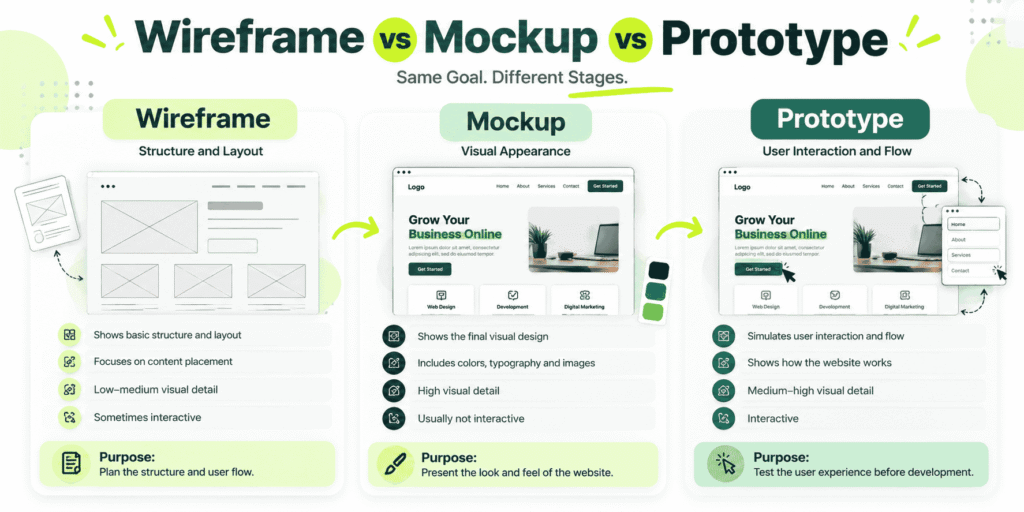
A simple way to remember the difference:
Wireframe = How is it structured?
Mockup = How will it look?
Prototype = How will it behave?
Website = The finished experience.
Website Wireframing for Businesses in Mohali and Chandigarh
If you are comparing web development companies in Mohali, don’t evaluate a website project only by its visual appearance.
Ask how the team approaches:
- Website structure
- User experience
- Mobile responsiveness
- Content hierarchy
- SEO
- Conversion paths
- Ecommerce functionality
- CMS requirements
- Third-party integrations
- Website performance
- Future scalability
The same applies when comparing a web development company in Chandigarh or a web designing company in Mohali.
A strong website project should begin with understanding the business and its users—not simply selecting a template.
For businesses in Mohali, Chandigarh, Panchkula, Kharar, and the wider Tricity region, this becomes particularly relevant when a website needs to support both local search visibility and broader business growth.
For example, businesses may research services related to:
- Website design in Mohali
- Website development in Chandigarh
- Shopify development company in Mohali
- Web development companies in Mohali
- Digital marketing company in Mohali
- Digital marketing agency in Chandigarh
- Marketing strategy in Mohali
- Marketing strategy in Chandigarh
These keywords should not simply be inserted into a page. The website architecture should make it possible to create genuinely useful pages that answer the corresponding search intent.
How Wireframing Supports SEO
Wireframing is not an SEO activity by itself, but it can create a stronger foundation for SEO.
During planning, consider where you will place:
Primary Page Topic
Each important page should have a clear purpose.
Heading Hierarchy
Use headings to organise the information logically.
Internal Links
Connect related pages naturally.
For example:
Brand Strategy → Marketing Strategy → Shopify
This helps visitors discover related services and creates a clearer site structure.
Helpful Content
Make room for explanations, FAQs, comparisons, guides, and other content that genuinely answers customer questions.
Local Relevance
If you serve businesses in Mohali and Chandigarh, relevant location-specific pages and content can be planned as part of the overall information architecture.
The important distinction is that local SEO should support real user needs rather than creating multiple near-identical location pages simply to target keywords.
Wireframing for Shopify Websites
Wireframing is particularly useful when planning an ecommerce store.
Before building a Shopify store, you can map:
Homepage
↓
Collection
↓
Product Page
↓
Cart
↓
Checkout
A product-page wireframe might include:
- Product images
- Product title
- Price
- Variant selection
- Product description
- Benefits
- Add-to-cart button
- Shipping information
- Returns information
- Reviews
- FAQs
- Related products
The objective is to make the purchasing journey understandable before investing time in detailed design and development.
For businesses searching for a Shopify development company in Mohali, asking about planning, information architecture, customer journeys, and ecommerce UX can therefore be more useful than evaluating design samples alone.Brandagic’s Shopify service focuses on strategic store planning, experience-led design, custom development and integrations, product architecture, launch strategy, and ongoing support.
Common Website Wireframing Mistakes
1. Starting With Colours
Colours are important, but they are not the first problem to solve.
Start with structure.
2. Designing Without a Clear Goal
If you do not know what the website needs to achieve, the wireframe can become a collection of sections without a purpose.
3. Ignoring Mobile
A desktop-only wireframe can create problems during development.
Consider mobile layouts from the beginning.
4. Adding Too Many Sections
More content does not automatically create a better website.
Every section should have a purpose.
5. Forgetting the CTA
A visitor should have a clear next step.
6. Treating Every Page the Same
A homepage, service page, blog article, product page, and contact page have different objectives.
Their structures should reflect those objectives.
7. Ignoring SEO Until Development Is Finished
SEO considerations can be incorporated into the architecture from the beginning. It is easier to plan logical pages, headings, internal links, content sections, and user journeys before development than after everything is already built.
What Should You Ask a Website Development Company Before Starting?
If you are evaluating a website development company in Mohali, web designing company in Mohali, or a development partner in Chandigarh, ask questions such as:
- What is the proposed website architecture?
- Will you create a wireframe before visual design?
- How will you plan the user journey?
- How will the website work on mobile?
- How will SEO considerations be incorporated?
- What CMS or ecommerce platform is appropriate?
- How will third-party integrations be handled?
- What content is required before development?
- How will performance and security be addressed?
- What happens after the website launches?
These questions can help you understand whether the project is being approached as a complete business asset rather than simply a collection of webpages.
How Brand Strategy and Marketing Strategy Connect With Website Structure
A website should not exist separately from the business’s broader strategy.
Your brand strategy influences:
- Positioning
- Messaging
- Differentiation
- Audience
- Brand personality
- Visual direction
Your marketing strategy influences:
- Acquisition channels
- Search intent
- Campaign landing pages
- Content
- Conversion paths
- Customer journeys
Your website brings these elements together.
That is why website planning can be connected to broader goals such as brand growth in Mohali, brand growth in Chandigarh, and long-term business growth. For businesses developing their positioning and marketing direction, Brandagic works across Brand Strategy, Marketing Strategy, Brand Consulting, Marketing Consulting, and Shopify as part of its approach to building and growing brands.
Website Wireframe Checklist
Before moving from wireframe to design, check:
- Website goal is defined
- Target audience is identified
- User journey is mapped
- Information architecture is planned
- Navigation is clear
- Main CTA is defined
- Key pages are identified
- Content hierarchy is logical
- Mobile structure is considered
- SEO requirements are considered
- Internal linking opportunities are identified
- Ecommerce flow is mapped where applicable
- Forms and conversion points are planned
- Stakeholders have reviewed the structure
- User testing or feedback has been considered
If these elements are clear, the transition from wireframe to design becomes much more structured.
Final Takeaway
A website should not begin with:
“Which design looks good?”
It should begin with:
“What does the user need, what does the business need, and how should the website connect the two?”
A website wireframe helps answer that question.
By defining the structure, information architecture, user journey, content hierarchy, CTAs, and mobile experience before development, businesses can make more informed decisions about the website they are building.
Whether you are exploring a web development company in Mohali, planning a website in Chandigarh, building a Shopify store, or redesigning an existing business website, wireframing gives the project a clearer foundation.
And when the website is connected to brand strategy, marketing strategy, and business goals, it becomes more than an online brochure—it becomes part of the larger system through which a business communicates, attracts, and converts customers.
Frequently Asked Questions
What is a website wireframe?
A website wireframe is a basic visual blueprint showing the structure, layout, navigation, content hierarchy, and key elements of a webpage before detailed visual design and development.
Why is a wireframe important for website development?
It helps identify structural and usability issues early, making it easier to refine the website before significant development work begins.
What should a website wireframe include?
It can include navigation, headings, content blocks, images or image placeholders, buttons, forms, CTAs, menus, and the overall page structure.
What is the difference between a wireframe and a website design?
A wireframe focuses primarily on structure and functionality. A website design adds the visual layer, including colours, typography, imagery, branding, spacing, and detailed UI components.
Should a Shopify store have a wireframe?
Wireframing can be useful for Shopify stores because it allows the business to plan product discovery, navigation, product-page structure, cart flow, and other important parts of the customer journey before detailed design and development.
How do I choose a website development company in Mohali?
Look beyond visual portfolios. Review the company’s approach to planning, UX, mobile responsiveness, SEO, platform selection, development, integrations, performance, and post-launch support.
Is wireframing useful for SEO?
Wireframing does not directly improve rankings, but it can help establish a logical website architecture where important pages, headings, internal links, content, and user journeys can be planned before development.
Can a website wireframe be tested?
Yes. Users can be asked to perform specific tasks using a wireframe or prototype. Their behaviour and feedback can reveal confusing navigation or unclear actions before the final website is developed.